Detection
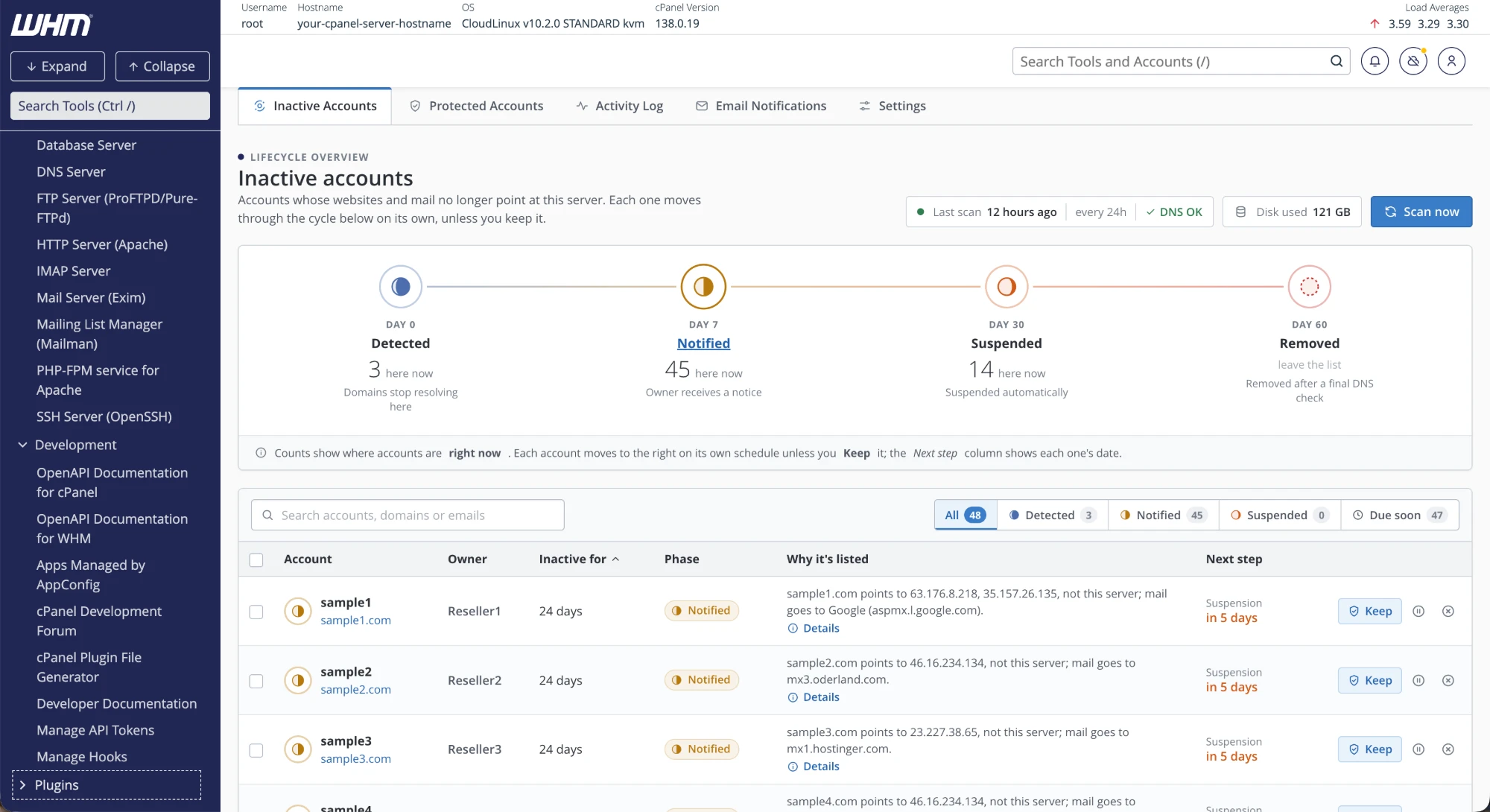
DNS is the only witness.
No guessing from logins, traffic or disk use. If a domain's website or mail points here, the account is active. If none do, it isn't.
A63.176.8.218
MXaspmx.l.google.com
Not this server
Inactive Account Manager for Hosts
IAM4Hosts finds the hosting accounts whose websites and mail have moved elsewhere, then notifies, suspends and removes them on a schedule you set. Nothing happens without a paper trail, and you can keep anything with one click.
Freeware edition, limited to discovering 10 inactive accounts. Pro is an in-app purchase.
Detection
No guessing from logins, traffic or disk use. If a domain's website or mail points here, the account is active. If none do, it isn't.
Lifecycle
Detected, notified, suspended, removed. Each one happens once, on the day you choose, and every one is logged.
Control
Staging site, a customer mid-migration, your own test box. One click on Keep and the scanner never touches it again.
Notices
Your logo, your colour, your words. A live preview shows exactly what resellers will receive at each stage.
Resellers
Root sees the whole server. Each reseller sees, keeps and is notified about only the accounts they own.
Security
Every release is signed with Ed25519 and checked by SHA-256 before a single line of it runs on your server.
signature ok · sha256 okCustomers move hosts. Domains lapse. The accounts stay behind, eating disk, backups, licences and your time.
of disk held by inactive accounts on a single production server, shown on the dashboard.
moving through the lifecycle on that same server, each with its reason in plain English.
Only public DNS decides. Nothing is removed without a final re-check on the day.
How detection works
For every domain on every account, including addon, parked and subdomains, IAM4Hosts looks up where the website and the mail really go. One domain pointing here is enough to keep the whole account active.
This server: 203.0.113.10 · mail.your-server.net
Any A record for any domain on the account resolves to one of this server's IP addresses.
The domain's MX records deliver to this server. Email-only customers stay active.
Cloudflare and your own nameservers are trusted by default, so proxied sites are never flagged.
Logins, files on disk, databases, FTP, or a domain that merely exists in the panel. None of them keep a ghost alive.
The lifecycle
Each inactive account fades on its own clock, counted from the day it was detected. Scroll to watch one go dark.
None of the account's domains point here for web or mail. It appears in your list with the reason spelled out. Nothing else changes: the site, mail and files are untouched.
The reseller who owns the account receives an inactivity notice listing it, why it was flagged and the exact suspension and removal dates. One email per stage, batched, never daily nagging.
Site and mail stop, through the control panel's own suspension, and a suspension notice goes out. Fully reversible: keep it, unsuspend it, carry on. Automatic suspension can be switched off.
On the day, DNS is checked once more. If any domain points back here, removal is cancelled and the account leaves the list. If not, it is removed and a final notice records it. Automatic removal can be switched off too.
Every account, explained
Open Details on any row to see every domain the scanner checked, what its records pointed to and when. Fixed the DNS? Re-check now and it leaves the list on the spot.
Every row says why in one sentence: where the site points, who handles the mail, how many other domains were checked.
Find any account by name, domain or email. Filter by Detected, Notified, Suspended or Due soon.
Tick a page of accounts and keep, notify or suspend them in one go. Root can scan on demand.
Protected accounts
A protected account is never flagged, notified, suspended or removed, and every future scan walks straight past it. Protect from the list with Keep, or by username before it is ever detected.
Left alone
Email notifications
Three templates, one for each stage, with placeholders for the reseller, the account list and the dates. Add your logo, pick an accent colour and watch the live preview change. Try it.
Accent colour
Placeholders
FromYour Hosting Co <notices@your-host.com>
Toreseller1@agency.co.uk
SubjectAction needed: 3 inactive accounts on your-server
Hi Reseller1, the accounts below no longer have any domains pointing at our server for web or mail. Unless you keep them, they will be suspended on 14 November and removed on 14 December.
| Account | Domain | Suspension |
|---|---|---|
| sample1 | sample1.com | 14 Nov |
| sample4 | sample4.com | 14 Nov |
| wedding-pix | weddingpix.uk | 18 Nov |
Sent by Your Hosting Co · You receive this because you own these accounts.
Settings
Set how long each phase waits, switch automatic suspension or removal off entirely, and tell the scanner what to leave alone. Drag the sliders to see a timeline for an account detected today.
Each date moves an account one phase to the right. Removal always waits for a final DNS check.
Domains on these nameservers always count as active.
Accounts owned by these resellers are never scanned.
Scan every 24 hours, or as often as every hour. The scheduler wakes every 5 minutes.
Each run checks for a newer release and tells you. Nothing installs itself, ever.
Up to date: 3.0.2
Activity log
Every detection, notice, suspension, removal, protection change and re-check is written down, with who did it: a person, the scanner or the scheduler. Filter by kind, keep as many days as you like.
Audit trail
Monday 3 November
Sunday 2 November
Root and resellers
Root runs the server: timings, templates, scans and every account. Resellers see the same tool, scoped to the accounts they own, so they can keep their customers' sites and fix DNS themselves. Switch the view.
| Account | Owner | Inactive for | Phase | Next step |
|---|---|---|---|---|
| sample1sample1.com | Reseller1 | 24 days | Notified | Suspension in 5 days |
| sample2sample2.com | Reseller2 | 24 days | Notified | Suspension in 5 days |
| sample4sample4.com | Reseller1 | 19 days | Notified | Suspension in 10 days |
| wedding-pixweddingpix.uk | root | 3 days | Detected | Notice in 4 days |
| sample12sample12.net | Reseller3 | 33 days | Suspended | Removal in 27 days |
| oldshopold-shop.co.uk | Reseller1 | 41 days | Suspended | Removal in 19 days |
Compatibility
The same scanner, lifecycle and screens, at home in whichever panel runs your servers. Plesk is supported on both Linux and Windows.
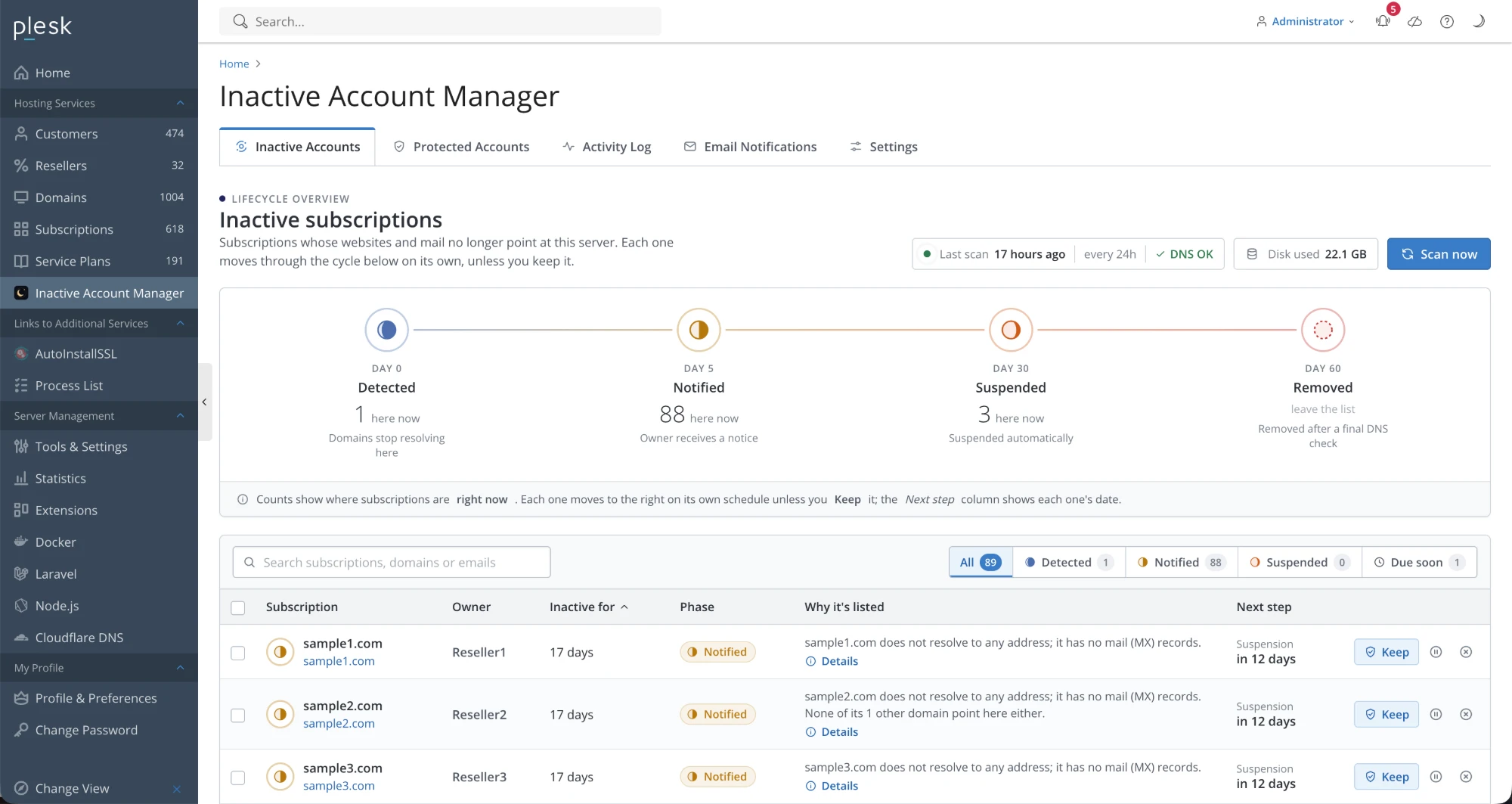
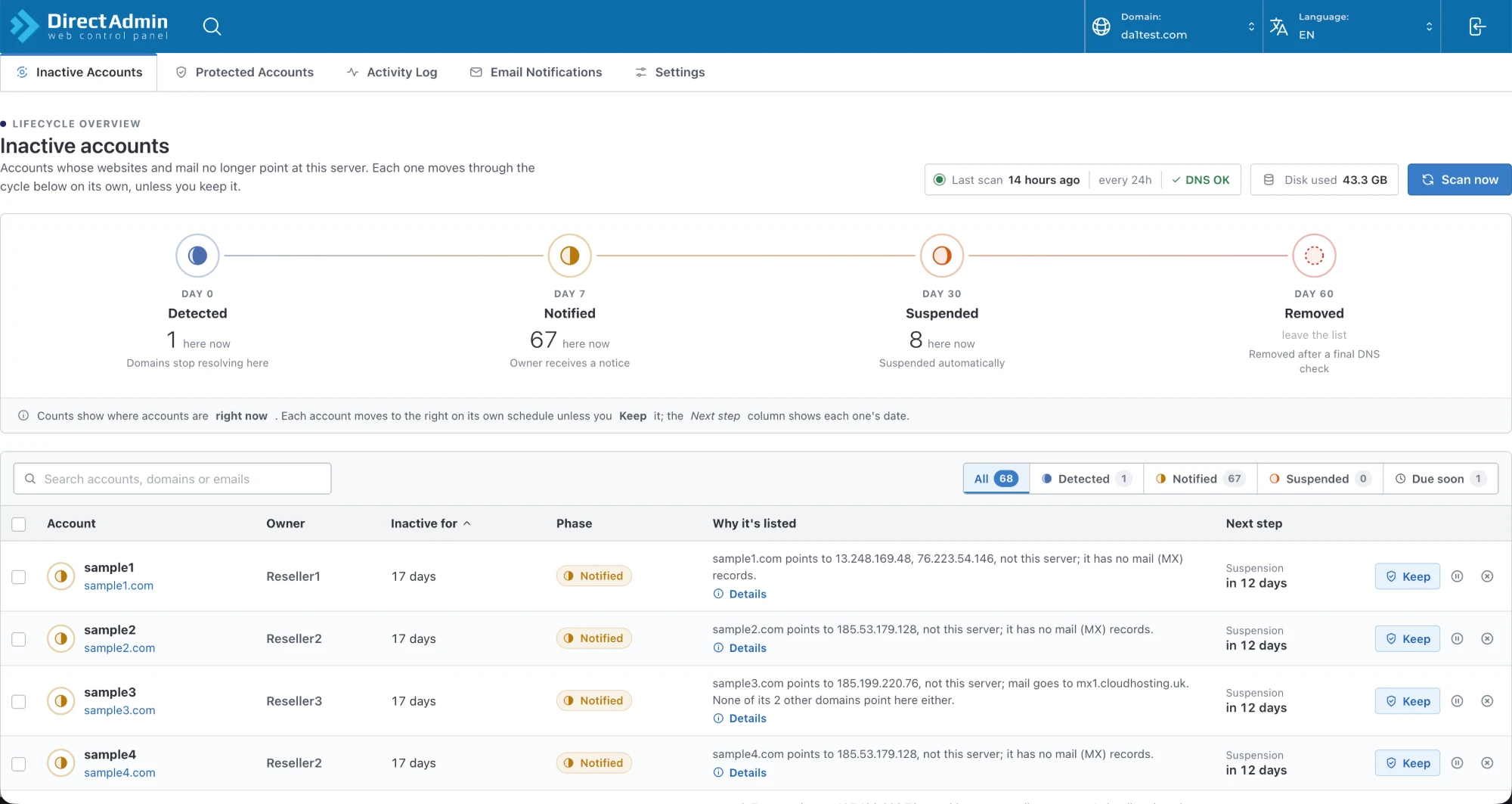
A native WHM plugin for root and resellers. Tested on WHM 138 with AlmaLinux 10 and CloudLinux 10.
A Plesk extension for administrators and resellers, uploaded through Extensions. Works per subscription, with multi-server mail awareness.
A DirectAdmin plugin at admin and reseller level. Needs DirectAdmin 1.689 or newer; tested on 1.712 with CloudLinux 9.
Installation
On cPanel & WHM and DirectAdmin, one command installs and later updates the plugin, keeping your settings, templates and history. On Plesk, upload the extension zip.
Free & Pro
Install the freeware edition on any server and see exactly what it finds. When you need more, upgrade in the plugin itself, no reinstall.
Freeware
£0
Free for ever, on any number of servers.
Pro
Unlimited
Unlock from Settings in the plugin.
Freeware version limited to discovering 10 accounts. In-app purchase available for the Pro version.
Not if any domain on it points here. An account is only inactive when every domain, including addon, parked and subdomains, sends neither web nor mail to this server and uses no trusted nameserver. On removal day DNS is checked one final time, and the removal is cancelled if anything has come back.
No. Cloudflare's nameservers are trusted by default, so any domain using them is treated as active. You can add your own nameservers, or remove Cloudflare from the list, in Settings.
The reseller who owns the accounts, never the end customers. Accounts owned directly by root notify the address you set in Settings. Resellers can choose where their own notices go.
Yes. Both are switches. With them off, IAM4Hosts detects and notifies on schedule, and you suspend or remove by hand when you are ready.
Everything, for up to 10 inactive accounts per server. It is a full install, so you can see exactly what it finds and how it explains it. Pro removes the limit and is bought from inside the plugin.
Yes. The Plesk edition runs on both Linux and Windows Plesk servers, and recognises mail hosted on a separate mail server in your DNS template, so those subscriptions stay active.
On cPanel & WHM or DirectAdmin, run curl -fsSL https://iam4hosts.com/get | bash as root over SSH; the installer detects the panel by itself. On Plesk, download the extension zip and upload it in Extensions → My Extensions → Upload Extension. The first scan runs within five minutes.
The plugin checks for new releases and tells you in a banner and in Settings, optionally by email. It never updates itself: you run the same one-line command, or upload the new Plesk zip, when it suits you. Settings, templates and history are kept.
On cPanel & WHM or DirectAdmin, run cd /root/InactiveAccountManager && bash install --uninstall as root. It removes the plugin files, the cron job, the panel registration, and the database and its user. On Plesk, go to Extensions → My Extensions → Inactive Account Manager → Remove; the scheduled task is removed first, then Plesk deletes the files and database. Uninstalling never changes any hosting account: anything it already suspended stays suspended until you unsuspend it in the panel.
Install IAM4Hosts free and see what's hiding on your servers by tomorrow morning.
Freeware edition discovers up to 10 inactive accounts. Pro unlocks unlimited, as an in-app purchase.